Monday, 15 April 2013

Individual contribution: Tom Rosbotham

Within the team, my work efforts were split between two sectors: character modelling and graphic design.

My main contributions were as follows:

  1. I got the ball rolling for our company's image by naming and designing the company logo.
  2. I proposed and drafted the initial design for using the university campus as the game's map, which was then passed onto Greg for development.
  3. I designed the corporate website, which was then passed onto Jayden for production.
  4. I modeled and animated a ghoulish character, and imported it into CryEngine.
  5. I scraped together the final pitch at the eleventh hour when it became apparent all other groups had prepared slides.

I was also in charge of managing the Abhuman blog, which I set-up and customized.

Individual contribution: Jan Holownia

My role within the team can be described as a game designer and programmer. I have also worked on some publicity and level editing. Most of my contribution has already been described in blog posts. Below is a short summary, together with links to relevant blog entries:

1. Worked with the team to agree on the game concept and basic gameplay elements.


2. Created some publicity for the project on CryDev website and a YouTube channel.

3. Designed and implemented first prototype of the level and gameplay mechanics.

4. Designed detailed gameplay mechanics and created a list of necessary programming tasks.

5. Research on CryEngine 3 SDK through documentation, active participation in CryDev forums and code debugging.

6. General organisation and management of collaborative work

8. Programming and Gameplay Implementation

Game Objectives and Explosions

As a kind of a final touch I've created a "Nexus" for each team, which should be destroyed by opposing team to achieve victory. The Nexus is a destroyable object with set amount of health which explodes once enough damage has been done to it. The AI characters will now go and attack the nexus after they went through the lane.


Humans' nexus model is a helicopter which brings reinforcements and supplies) which I chose mainly as it has its own on-hit decals and a destroyed model.


Zombies' nexus looks deceptively like a big rock but in reality it's a biological artifact which provides zombies with power.

The team which destroys the opposing team's nexus first wins which results in spectacular explosion as seen in the video below.

Sunday, 14 April 2013

Individual contribution: Gregory Phillips

My roles for the project split my contribution into two sections,
Firstly, I was project manager, and led meetings/scrums following an agile development recording progress and delegating tasks via Pivotal Tracker:
https://www.pivotaltracker.com/s/projects/746883

We added a large number of tasks to the icebox, planning out potential goals, but many were not reached as our velocity was lower than initially expected. This is largely due to issues with using CryEngine, and the learning curve associated with it.
As such many tasks listed remain unfinished.


Additionally I lead arranging meetings and managed correspondence with our project supervisor, Ewan Armstrong, and Dan.

My second role was creating the map, or 'static 3D assets', 'level design' or 'level development' type names fit the jobs I undertook.

This ranges from working with the team from a concept level to draft out the game concept, and more specifically the map layout.
From these concepts we decided that it would be both interesting and beneficial to base the level around the university campus. This gave us unlimited access to the actual environment, and allowed us to get many reference materials easily, as well as being a suitably sized and shaped area of urban terrain.


From this I made some concept art piecing together a satellite image of the campus (Google maps) and pictures of rubble etc.


Based on advice from Ewan, the first phase of map development was to 'white-box' (create a simple mock model of) the entire area as quickly as possible in order to test game-play  This was my first experience using 3D modelling software, but I learnt the necessary skills to create basic models. The largest issue was with the exporter for putting models into CryEngine being buggy, and very poorly documented, and this ate a lot more time than it should have.
From here,its became clear the the amount of work to model the entire map to a fidelity that matches the detail of CryEngine assets would not be feasible in the time for development that we had. Instead, I would develop a few key buildings in the most important areas to represent how the game would look once completed, given a larger development period. In order to create these buildings I learnt a new set of skills, in 3D modelling with Maya 2013.
All models are in the submission folder as Maya binaries (.mb files).

Once the models were complete, to improve the overall quality of the map, the models were merged with existing assets from CryEngine and Crysis3, to give an edge of professional quality art. The models were not textured due to not having time to learn the skills required to texture as well as model. Instead, a smooth single colour was applied to give a clean cut prototype appearance.


The complete map has been incorporated into the final game files, and can be best explored within the cry-engine editor, note that some layers can be hidden (if things disappear).

As well as working through the map development process, I documented the development of the game play concepts that were agreed between the group. This was recorded in the form of story boards:


Tuesday, 19 March 2013

Gameplay implementation progress

Here's what I managed or didn't manage to do before the presentation tomorrow.

Improved game loop

I've spent unreasonable amount of time on it and it doesn't have any immediately visible effect but I've changed all my objects to now be updated in the main game loop which is the proper way of doing this. Previously the creation, update and destruction of objects would take place in various more or less random places.

What this achieves mainly is that I now have full control on where and how the objects are created and updated. For example I can now use postUpdate() method to render stuff on the screen, which is visible as it gets rendered after everything else. This way I've managed to implement player name and health being displayed above the character and also a simple mouse feedback animation. 

Improved code should also make a further development easier.

Multiplayer

I've managed to setup multiplayer in the level! Upon joining the multiplayer game you'll now spawn randomly into one of the teams. It is also possible to spawn on the same team as the picture below illustrates one of the teammates being seriously threatened by the AI.

Two clients and a dedicated server running Campus: Deathmatch

Monday, 18 March 2013

map progress (to be updated as i go)

Ill add images of areas as I create them here:


Update 4:
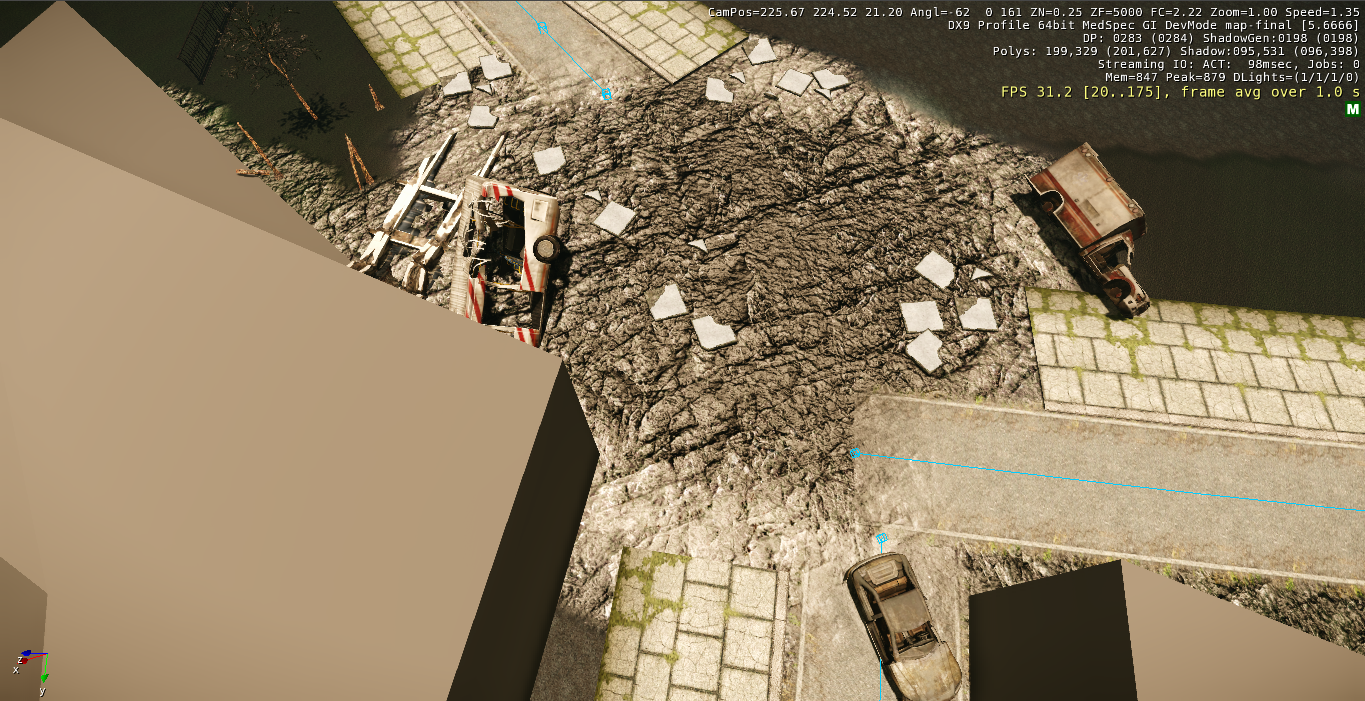
bloody spawning pool? hwahaha to much? i think it looks like a cross between biomass, water, pebbles and body-part soup! (i think it works):


Update 3:
strafing-run across the city? (bombing in a line) i think this looks pretty good bearing in mind you'll see it a bit at a times:


Update 2:
bot-lane corner:


Update 1:
human spawn:
Road block (south east): were the army trying to... keep people in?!

He's hirpling!


So, after almost a week of trying to get my animation out of Maya I decided - f*** it. I spent all of last night and this morning following a 3DS Max tutorial and it worked first time. I now having a character the walks, and now that it's working I could easily make more - but I'm probably out of time (I'll make more anyway).

Unfortunately, I had to use the base mesh from Mudbox as Max had an issue with my clothes (they were locked to a single joint, and didn't bend with the rest of the body)... but we can just apply that algae texture and no-one will never know. ;)

Friday, 15 March 2013

Master map and Game.dll


Game.dll

I have uploaded the latest version of Game.dll to our dropbox. You'll find it here:


It's far from finished but it provides a good indication of the view and mechanics, so it will help you put things in context. The camera is pretty much done, but the movement is rather retarded atm as it doesn't use the AI (working on it). Also this only affects the launcher.

To use make a backup of CryGame.dll in bin32/bin64 folder and replace it with this file.

Map


I put the map on github at:

https://github.com/jholownia/hotwmap

I think the map is too big now. The previous one was 256x256 and this one is 512x512 and everything looks a bit out of scale, but have a look yourself.

Thursday, 14 March 2013

Brraaaaainnnss

I should have him fully walking by tomorrow. Animating someone herpling on the spot is unnerving - I might just make him move forward in the scene to get the visuals right, then just translate him to the middle to have him do it on the spot.

UPDATE:


I exported the model into Maya and Greg said to stick on a random texture - turns out algae makes an awesome mummified corpse look. I was scrolling through the list, and stumbled across an animated algae texture... kinda looks like a cloud of infection. Could work instead of a texture! ^_^

Wednesday, 6 March 2013

Playing around with Crysis 3 assets

I've been browsing through Crysis 3 pak files and there seem to be quite a lot of stuff we can use in our level. Below is a reference image from google earth and a scene from Greg's map in the same place using some of C3 assets. Once we have proper buildings this should look pretty good.

Also, if there's time, I think it would be cool to have some details on the map which are associated with the campus like a rusty UoP sign or something.


Tuesday, 5 March 2013

Coding progress update

I've finally got a working top-down camera in place. It is controlled by mouse, spawns at the top of the player and follows terrain's elevation to stay at the constant height. It also provides limited zooming in/out functionality with a mouse scroll wheel. Overall works pretty well.

The main problem was the fact that CE3 provides multiple systems for the same tasks (and all of them equally undocumented) E.g. for the input there are high level Action Maps, which use XML to map input types to in game actions, CryInput module which provides device independent input abstraction, and low level hardware access classes. In Game.dll for some reason there are also two camera systems (PlayerView and CameraManager) which seem to do pretty much the same thing (it looks like they were in a process of moving from PlayerView to CameraManager which provides some more functionality). Anyway both of these classes seem to be designed for a player-following camera (1st of 3rd person) and so after a while I gave up trying to modify them for our needs.

What I ended up with is a completely new TopDownCamera class using only low level input and basic ViewParams struct to implement camera functionality. It may not have some of the fancy features of the higher level solutions but it seems enough for our current needs and still much better then flowgraphs. I also think this is the best approach for creating new stuff, i.e. building it from scratch rather than trying to modify existing code.

Sunday, 3 March 2013

Outfitting

Progress could be better, but it's getting there:

Update 2:

Saturday, 2 March 2013

Reservoir wall

Little modelling update. more to come, but I was quite pleased with this. i intend to have the tower on the left fallen into the first two segments of wall to create on entrance into the reservoir behind it, making a nice opening to the top right spawn area.


There is however an exporting error with the tower... something along the lines of degenerate faces... faces with 3 same coordinates so perhaps that's a question for Ewan. I've tried the clean-up and merge verts/edges functions so it is an odd one. although I've noticed that extruding in two directions (once inwards once outwards) on the same side of an object (but a different face) seems to have some odd effects with the faces I've divided with the interactive split tool.

Friday, 1 March 2013

HotW on GitHub and new CryEngine

I have created HotW public repository on GitHub which you can access here:

https://github.com/jholownia/HotW

This makes it easier for me to work from multiple machines and also if I screw up (which has happened) I can go back to an earlier working version. If you ever wonder all my changes in the code are preceded by // (jh) comments so they are easy to find. If you open Visual Studio solution there is also hotw filter were I place all additional classes. I should probably make a separate folder for that.

Also github offers free hosting of project pages so unless there is a better option we can use that for our website.

Finally the new version of CryEngine has just been released and I've almost painlessly migrated our level and code to it.

CryEngine 3.4.5 Download


Wednesday, 27 February 2013

Website Design

Jayden says he's better at the development than the design, and I've always enjoyed the design more than the development... so I thought I'd have a go at designing the website. Jayden's already emailed around the first prototype, and it's looking good. I feel like I'm betraying my design training by wanting gimmicky features (what with one of the first rules of design being - simple is better).

Crude design made in Paint:


I've also created a more complex design template in HTML, although it is difficult to take a printscreen on account of the relative dimensions. If anyone knows of a quick way to take a panaramic screen shot of a webpage - I'm all ears.

Tuesday, 26 February 2013

26/02/13 group meeting

We are piecing together all of our components together this session. Thus far we have a white boxed map, a basic UI into the engine and a custom camera in development, the character is yet to be animated but the basic model is made.

My (Greg's) first model of the Brunel labs seems to have corrupted, but progress shouldn't be a problem from here on. The plan is to make a base frame for each building to a reasonable quality, then to look at texturing the core pieces of the map as portfolio pieces and to bring to life the tutorial area of the map. Destroying the buildings will come after completing the map, as having a playable map that is less destroyed is better than partial rubble.

Links:
http://www.creativecrash.com
searching for fracture scripts: a way to decompose my constructed buildings into ruins without manually doing each.

Monday, 25 February 2013

progress update

-Quick reminder: group meeting starts at 3 this week-

So after last week there was a positive vibe in the group, with things coming together and each of us being able to focus on our own roles more individually.Sound too good to be true? yeah.. so I've had a week of technical difficulties ranging from having no internet since Wednesday, to my computer completely locking up at times for no apparent reason. Despite this I have managed to create something... not as impressive as I would like, but a start.

I took some reference photos of the Brunel labs, and started to model from them. I started with this building as is quite central to our map, and has some unique quirks that seemed interesting to build.


From these I have made a start on the model, with many surfaces flat but with textures in mind (i.e. the windows)


There have been for few issues I've been having with Maya, but having the internet to solve those would probably have been enough... but I feel I will be able to pick up the pace a bit (thankfully) over the next week.

And I thought getting used to Maya's controls would be hard...

Let's just say without a formal introduction, me and Zbrush will NOT get along. I had to use Google just to figure out how to zoom in and out - that's just counter-intuitive!

When are those workshops again?

I think I'm going to try and animate ZBrush's default skeleton, and make this my "whitebox" for the zombies... then I can just add "clothes" in the form of  decomposed arms and sagging flesh. I think it'll look awesome.

No concept artwork, I'm afriad. My plans for last week were ruined changed when my mum reminded me I was going home for the weekend (for my birthday).

Tuesday, 19 February 2013

PR - Abhuman Studios

We haven't really discussed PR, but as part of our company image I think it would appropriate (is that the right word?) if we actually dressed up as zombies for demos and such. Even if it's zombies in suits.


Image from: http://browse.deviantart.com/art/zombie-14448624

Monday, 18 February 2013

I'm not a religous person... but this was a miracle!

TA DAAAAAAHHHHHHHHHHHH! LOOONGGG over due and after literally hours of arguing with software!


now to model each of these in detail... learn UVW/texture mapping and make it look pretty! still, very satisfying to walk around this at last.